Showing posts with label iphone. Show all posts

Thursday, January 14, 2010

iPhone Application


I am pleased to announce that you can now read this blog (and also the Core Economics blog) on an iPhone app: CoreEcon. Click here to download it from the US iTunes App Store.

It is better than a web page because you can download the posts and read them when you are on a plane or something. And it is optimised for iPhone reading.

Given the fierce competition for attention, I have competitively priced it at $0. Clearly a must have.

Friday, May 22, 2009

Revolutionary parenting innovation: The outdoor computer game

OK here is what you need.
  1. An iPhone or 2
  2. Some children
  3. A park
  4. Good GPS and Network coverage
  5. Some apps
And it turns out that you have a unique outdoor activity involving a computer game, running around and educational value too boot. Never has a perfect compromise been reached on suitable parenting/video game activities.

How is all of this possible? There are two new applications at the iTunes App Store: The Hidden Park and Seek 'n Spell.

Let's start with Seek 'n Spell as it can be played at any largish park. It can be played with one iPhone but I can tell you that having more than one is much better. Now that might sound extravagant but uniqueness doesn't come for free.

You go to the park and launch the App. It asks you to gather up your players, it finds your location and then populates a map of the area with letters. You can see the results to the left. You then set the time and you run around gathering letters (as you reach one it gathers it up and prevents others from using it) and try to spell as many words as possible. The longer the word the better.

You can also see where your other competitors are -- a useful feature for parents watching out for children.

This game is just fantastic. You may have an advantage on the spelling but your kids are quicker in gathering up letters so there is real competition.

There is a ton of potential here. One thing I would like to see is the ability to scale the area in case you are in a smaller park. Try it there and you might to scramble on top of houses to get the letters you want. You can see we played it on a cricket oval and needed the entire area.

Expect to see maths and other versions too.

On to the Hidden Park. This one requires a specific park. So you can play it in New York, Boston, Toronto, Tokyo, London, Munich, Hong Kong, Sydney and fortunately for me, the Royal Botanical Gardens in Melbourne.

This game is an adventure. What happens is this. You get to the park at a specific location (in our case, Gate D at the RBG). The phone then rings and it is some frantic park ranger (ours was Australian) who informs you that developers are threatening to destroy/develop (depending on your perspective) the park. However, if you can find evidence of magical creatures you can save the day. That might seem like a difficult task but as you move around the map, you solve puzzles and take pictures that reveal those creatures.

Then the goal is to snap some pictures and email them to the authorities. Those pictures are pretty exciting loooking as you can see.

The game itself takes about an hour. We traversed the entire park and thankfully ended at the Cafe! Now that is magical.

This is well worth the $5.99 for the activity and you only really need one iPhone to do it all with as you are merely racing against the evil developers. However, it probably is most exciting for children 5 to 9. When it comes down to it, the game isn't that challenging but it is an indication of things to come. So much more is possible.

We are moving to a new era in games. This type of thing could take off in a big way. Indeed, I can see a time where someone provides a platform and you can make your own games for a terrific kids party experience.

For now, I recommend these two very highly. And if you are thinking "what if I don't have an iPhone?" then just add that to the list to get one.

Friday, November 14, 2008

More iPhone apps for parents


I have posted before on iPhone apps for parents. There are some newcomers that seem interesting [HT: TAUW].

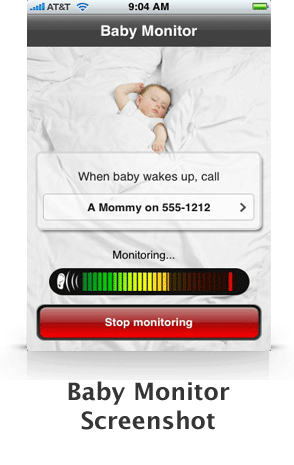
This one is a baby monitor. Put your iPhone in the same room as your baby and it calls you when the baby cries. If you want to be irresponsible, you could even leave the house and go down the street. It is less than $1.

Another one allows nappy behaviour data collection if you are in to that sort of thing.

Then there is JirboMatch which is a simple matching game. My 4 year old loves this.

Here is a link to many others.

Sunday, November 2, 2008

Economics education on the iPhone


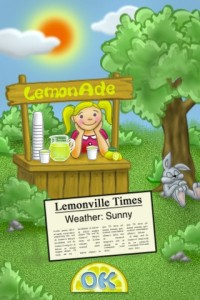
Just released for the iPhone is Lemonade Stand. It is $0.99 (click here). It is the best economics teaching tool for school aged kids. Basically you run a Lemonade Stand. This involves looking at the weather, setting price, choosing quantity and also your level of advertising. To make a profit you need to get close to the demand curve in these choices and pay attention to costs.

Child No.1 is, not surprisingly, playing it intensively. Indeed, I think she is outplaying me in terms of earnings. Then again she cares about virtual money much more than I do.

Friday, August 15, 2008

iPhone Apps for Parents

A while ago I had an idea for a great iPhone application -- a one button locator of baby changing facilities that would take into account where you are and direct you to the nearest place -- by driving or walking. Sadly, that idea, and its more general toilet finder application, fell down for lack of data which was held in a non-useful form by the Australian government. Hopefully, someone else will work out how to cut through the bureaucracy and find us some relief.

But there are a few iPhone applications arising that are targetting parents or soon to be parents. For fun, as I no longer have to care about these issues myself, I thought I'd list the ones I know of here:
  • Baby Tracker: Nursing -- this application keeps track of a baby's feeds, whether it is right side or left and for how long. I guess you could integrate the data with Trixie Tracker and you would be all set. (There is also a version of this that is 10 times cheaper called BBuddy but I couldn't work out how to link to it).
  • Bishop's Score Calc: this one calculates the probability of an impending ability as well as various possible complications. I guess if you are sitting there pregnant with nothing better to do ...
  • Pregnancy Kick Counter: you can use this application to count how often your baby is kicking as if (a) you can't tell and (b) you need yet another thing to worry about. Thank goodness no one recommended to us to do that.
  • OB Counter: That said, if you are trying to time deliveries and plan ahead, this free app will calculate you due date. Of course, this thing has been around online forever but I guess if you are out and about and want to make sure you are not busy in 38 weeks time so as to assess risks, the iPhone app is for you.
  • Food Additives: If you are managing the stuff going into your child, this application is for you. Enter the food you are thinking of feeding your child and it tells you just how bad it is. In our preservative-free house, I won't be able to sneak stuff in even when we are out and about.
There is other stuff in terms of game and childrens' books but I will list them later.

Sunday, July 13, 2008

Hedge mazes and iPhones


Melbourne is surrounded by hedge maze attractions; you know, the big things like they had in Harry Potter and the Goblet of Fire but with fewer dragons. This weekend we had visitors and so trekked out to one of these. These are great activities for the kids. Basically, they can run off on their own and unlike your normal predisposition on such things the actual point is that they get lost and have to work their way out.

For parents you are either going to do take it seriously or not. Common sense would dictate making that decision prior to entering a maze. Sadly, you usually decide on this after you have stepped in the maze and are yourselves, lost. So there I was, along with a prominent economist, both realising that we were too busy talking about other stuff to have paid attention where we were going. It could take a good half hour to navigate our way out.

Fortunately, I decided on another path. I had a newly purchased iPhone 3G and so decided to use the GPS to locate us on an actual aerial shot of the maze. My colleague had a Blackberry that did a similar thing but the screen shot was too small. For me, the screen shot was barely readable but didn't quite have the detail to help us get out. The technology failed us. That said, I was able to see whether it was possible to book a nice lunch at a warm restaurant as we trapsed through. Turned out it wasn't but I could at least multi-task.

We eventually emerged from the maze. There was a tower at the end so we could see what else is happening. There were some adults in a 'clearing' and they signalled our attention. They then held up a child and asked us if we owned him. Turned out that it was my 7 year old son. (He had got really lost and used the age-old strategy of 'looking lost with a hint of distress' to secure help). So after a thumbs up I re-entered the maze to locate the clearing. Of course, that was as hard as finding your way out. This time I took another child who had paid attention with me so it was a bit quicker.

And the moral of this story is ... hedge mazes are fun but current technology isn't going to save you just yet.

Wednesday, June 11, 2008

Age-Appropriate Gadgets

In today's New York Times [HT: Andrew Leigh], an article about growing up with gadgets. There is not much in there that isn't just plain common sense. After all, you may read about some 2 year old using a computer but in actuality that is a rare, rare event.

We have had mobile phone discussions in our family but basically, until they are out on their own there is no need. Our 9 year old says the school doesn't allow them and being so damn obedient there, she would likely refuse one if offered. Our 7 year old, on the other hand, wants nothing less than an iPhone but that is for a different reason that I'll come to in a second.

That said, our kids are hardly gadget free. The two eldest have iPods and DSs that we have found invaluable when traveling. The 3 year old wants them too but doesn't care as much about whether they work. So she has been given a iPod cardboard cut out from one of our iPod accessories and she is happy with that. That said, there is something a little sad in that whole transaction and I'm sure she will have the three dimensional variety soon enough.

It is my 7 year old son that is the gadget fan and there is little holding him back. He gladly watches all of the ads and video demonstrations on apple.com. He feels our house deserves a MacBook Air for the excellent reason that it is currently the best. We have resisted. But following on the New York Times article, he will do anything so long as it is on a computer. I downloaded the wonderful MIT programming software Scratch. It is a programming environment for kids and he quite happily develops animations and stories on it.

But now that he saw Steve Job's keynote on the iPhone applications and the demonstration of how easy it is to write applications with the SDK, he has become very interested in that. So we have officially registered as an Apple Software Developer and have downloaded the software. It is tricky but there are lots of video guides.

And what am I really after in all of this? Basically, what I want is a headline: "7 year old programs and launches software on the iPhone App Store." If we can manage that, he can have an iPhone for his 8th birthday.